AB-3 Developer Guide
Acknowledgements
- {List the sources of reused or adapted ideas, code, documentation, and third-party libraries here, with links to the originals.}
Setting up, getting started
Refer to the guide Setting up and getting started.
Design
Architecture
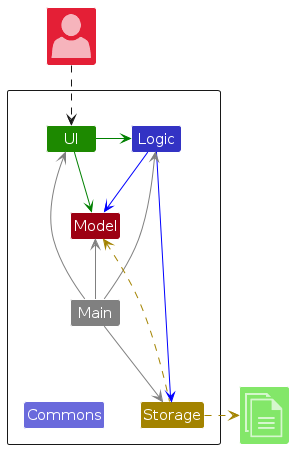
The Architecture Diagram given above explains the high-level design of the App.
The following provides a quick overview of the main components and their interactions.
Main components of the architecture
Main (consisting of classes Main and MainApp) is in charge of the app launch and shut down.
- At app launch, it initializes the other components in the correct sequence, and connects them up with each other.
- At shut down, it shuts down the other components and invokes cleanup methods where necessary.
The bulk of the app's work is done by the following four components:
UI: The UI of the App.Logic: The command executor.Model: Holds the data of the App in memory.Storage: Reads data from, and writes data to, the hard disk.
Commons represents a collection of classes used by multiple other components.
How the architecture components interact with each other
The Sequence Diagram below shows how the components interact with each other for the scenario where the user issues the command delete 1.

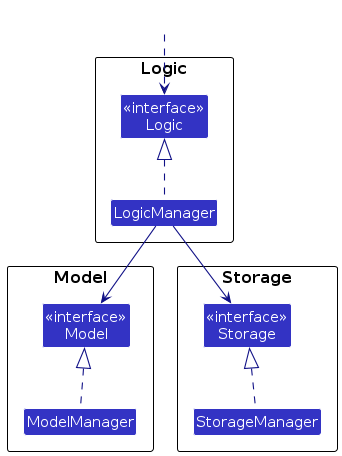
Each of the four main components (also shown in the diagram above),
- defines its API in an
interfacewith the same name as the Component. - provides its functionality through a concrete
{Component Name}Managerclass that implements the corresponding API interface.
For example, the Logic component defines its API in Logic.java and implements it in LogicManager.java. Other components interact with a component through its interface rather than its concrete class, preventing them from coupling to that component's implementation, as illustrated in the following partial class diagram.
The sections below give more details of each component.
UI component
The API of this component is specified in Ui.java
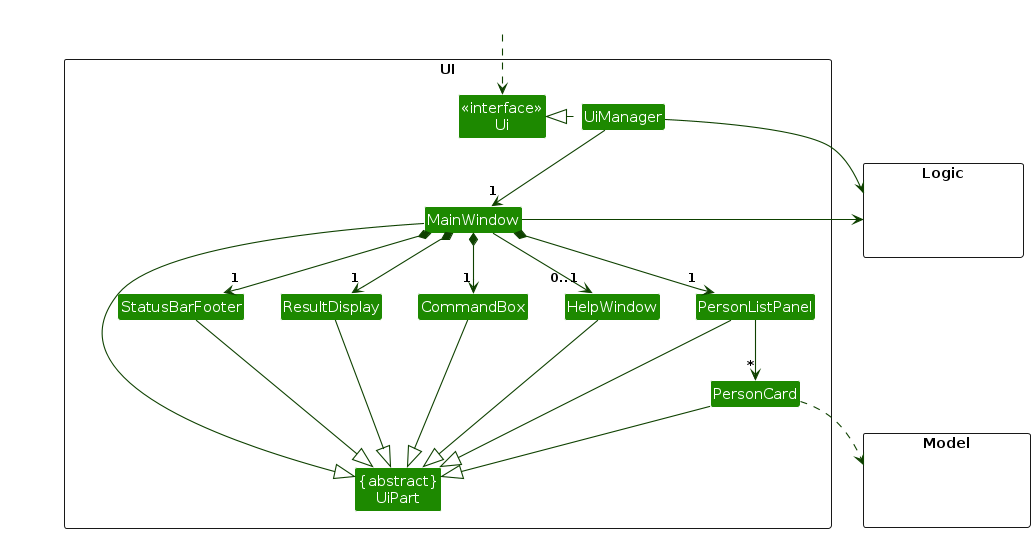
The UI consists of a MainWindow and its parts, such as CommandBox, ResultDisplay, PersonListPanel, and StatusBarFooter. All of these, including MainWindow, inherit from the abstract UiPart class, which captures common behavior among classes that represent visible GUI parts.
The UI component uses the JavaFX UI framework. The layouts of these UI parts are defined in matching .fxml files in src/main/resources/view. For example, MainWindow.fxml specifies the layout of MainWindow.
The UI component,
- executes user commands using the
Logiccomponent. - listens for changes to
Modeldata so that the UI can be updated with the modified data. - keeps a reference to the
Logiccomponent, because theUIrelies on theLogicto execute commands. - depends on some classes in the
Modelcomponent because it displaysPersonobjects from the model.
Logic component
API : Logic.java
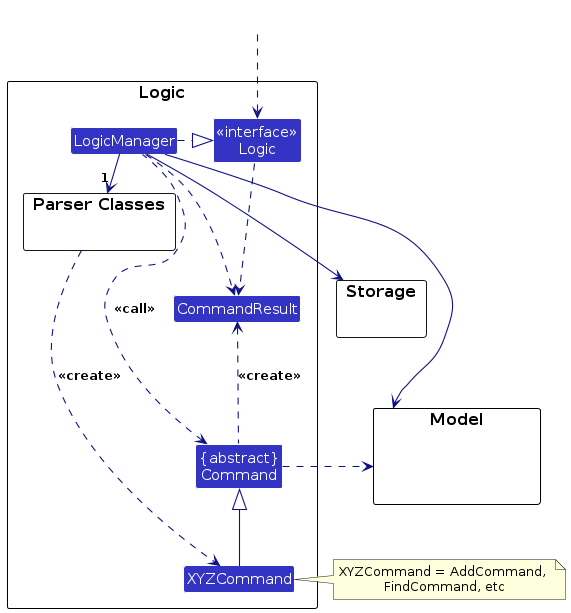
Here's a (partial) class diagram of the Logic component:
The sequence diagram below illustrates the interactions within the Logic component, taking execute("delete 1") API call as an example.
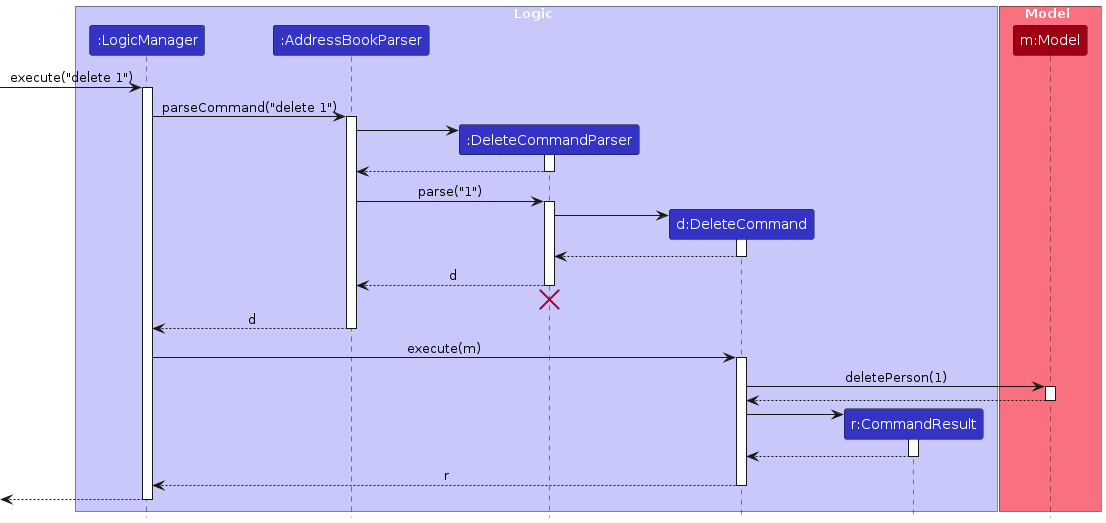
Note: The lifeline for DeleteCommandParser should end at the destroy marker (X), but due to a limitation of PlantUML, the lifeline continues till the end of diagram.
How the Logic component works:
- When
Logicis called upon to execute a command, the command is passed to anAddressBookParserobject, which in turn creates a parser that matches the command (e.g.,DeleteCommandParser) and uses it to parse the command. - This results in a
Commandobject (more precisely, an object of one of its subclasses e.g.,DeleteCommand) which is executed by theLogicManager. - The command can communicate with the
Modelwhen it is executed (e.g. to delete a person).
Note that although this is shown as a single step in the diagram above for simplicity, the code can require several interactions between the command object and theModelto complete the operation. - The result of the command execution is encapsulated as a
CommandResultobject which is returned fromLogic.
Here are the other classes in Logic (omitted from the class diagram above) that are used for parsing a user command:
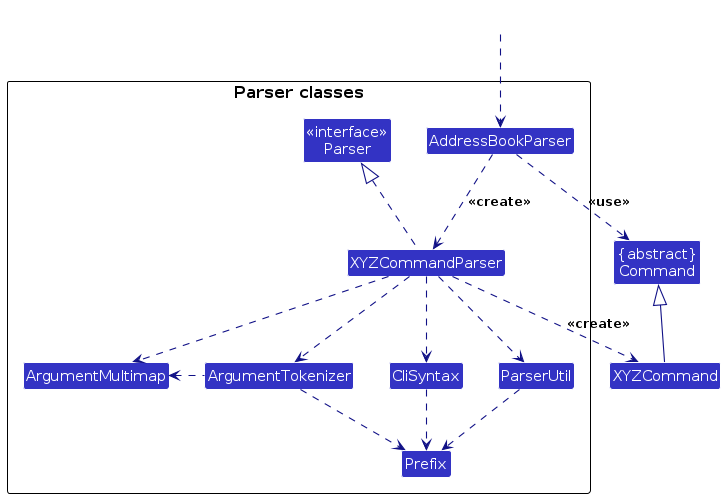
How the parsing works:
- When called upon to parse a user command, the
AddressBookParserclass creates anXYZCommandParser(XYZis a placeholder for the specific command name, e.g.,AddCommandParser). The parser uses the other classes shown above to parse the user command and create anXYZCommandobject (e.g.,AddCommand). TheAddressBookParserreturns that object as aCommandobject. - All
XYZCommandParserclasses, such asAddCommandParserandDeleteCommandParser, implement theParserinterface so they can be treated similarly where appropriate, for example during testing.
Model component
API : Model.java
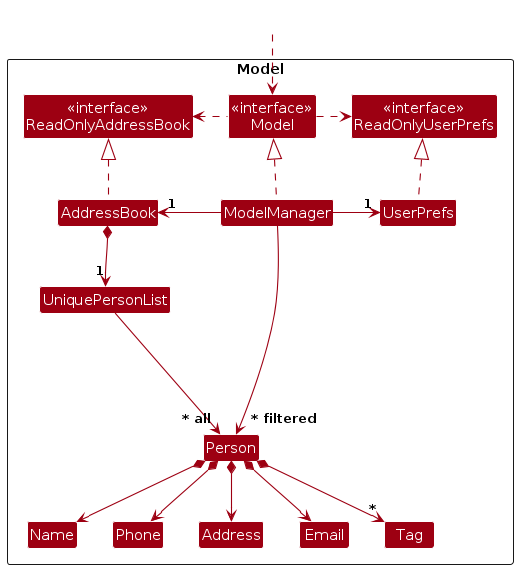
The Model component,
- stores the address book data i.e., all
Personobjects (which are contained in aUniquePersonListobject). - stores the
Personobjects selected by the current filter, such as search results, in a separate filtered list. It exposes this list as an unmodifiableObservableList<Person>that the UI can observe and bind to, so the UI updates when the list changes. - stores a
UserPrefsobject that represents the user’s preferences (currently, just the GUI settings). This is exposed to the outside as aReadOnlyUserPrefsobject. - does not depend on any of the other three components (as the
Modelrepresents data entities of the domain, they should make sense on their own without depending on other components)
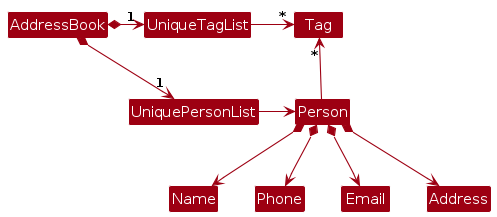
Note: The alternative, arguably more object-oriented, design below keeps a unique list of tags in AddressBook, and each Person references tags from that list. This lets AddressBook maintain one Tag object per unique tag instead of each Person holding its own Tag objects.
Storage component
API : Storage.java
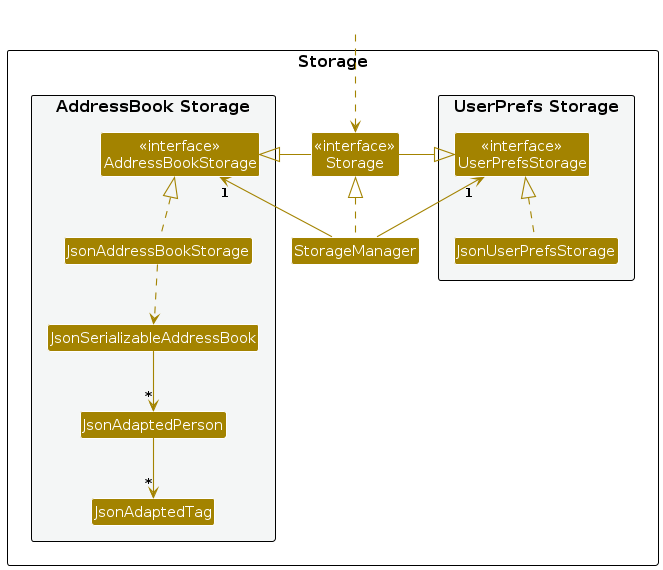
The Storage component,
- can save both address book data and user preference data in JSON format, and read them back into corresponding objects.
- is implemented by
StorageManager, which delegates the actual JSON file access toJsonAddressBookStorageandJsonUserPrefsStorage(one class per data file). - depends on some classes in the
Modelcomponent (because theStoragecomponent's job is to save/retrieve objects that belong to theModel)
Common classes
Classes used by multiple components are in the seedu.address.commons package.
Implementation
This section describes some noteworthy details on how certain features are implemented.
[Proposed] Undo/redo feature
Proposed Implementation
The proposed undo/redo mechanism is facilitated by VersionedAddressBook. It extends AddressBook with an undo/redo history, stored internally as an addressBookStateList and currentStatePointer. Additionally, it implements the following operations:
VersionedAddressBook#commit()-- Saves the current address book state in its history.VersionedAddressBook#undo()-- Restores the previous address book state from its history.VersionedAddressBook#redo()-- Restores a previously undone address book state from its history.
These operations are exposed in the Model interface as Model#commitAddressBook(), Model#undoAddressBook() and Model#redoAddressBook() respectively.
Given below is an example usage scenario and how the undo/redo mechanism behaves at each step.
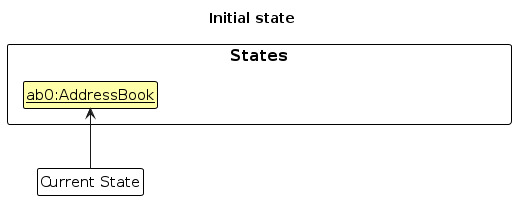
Step 1. The user launches the application for the first time. The VersionedAddressBook will be initialized with the initial address book state, and the currentStatePointer pointing to that single address book state.
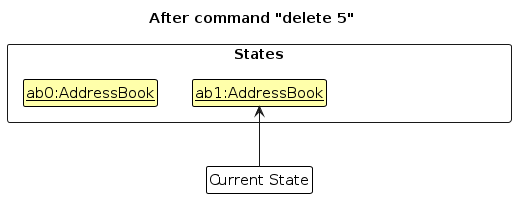
Step 2. The user executes delete 5 command to delete the 5th person in the address book. The delete command calls Model#commitAddressBook(), causing the modified state of the address book after the delete 5 command executes to be saved in the addressBookStateList, and the currentStatePointer is shifted to the newly inserted address book state.
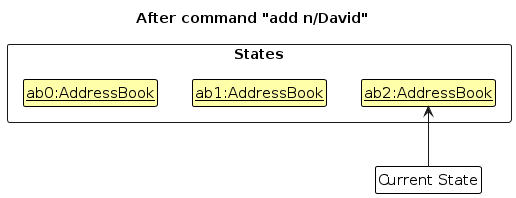
Step 3. The user executes add n/David … to add a new person. The add command also calls Model#commitAddressBook(), causing another modified address book state to be saved into the addressBookStateList.
Note: If a command fails its execution, it will not call Model#commitAddressBook(), so the address book state will not be saved into the addressBookStateList.
Step 4. The user now decides that adding the person was a mistake, and decides to undo that action by executing the undo command. The undo command will call Model#undoAddressBook(), which will shift the currentStatePointer once to the left, pointing it to the previous address book state, and restores the address book to that state.
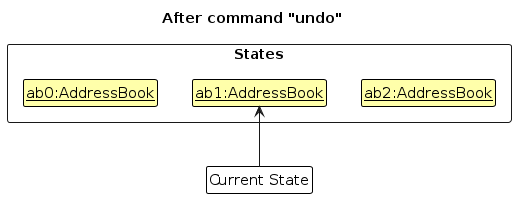
Note: If the currentStatePointer is at index 0, pointing to the initial AddressBook state, then there are no previous AddressBook states to restore. The undo command uses Model#canUndoAddressBook() to check if this is the case. If so, it will return an error to the user rather
than attempting to perform the undo.
The following sequence diagram shows how an undo operation goes through the Logic component:
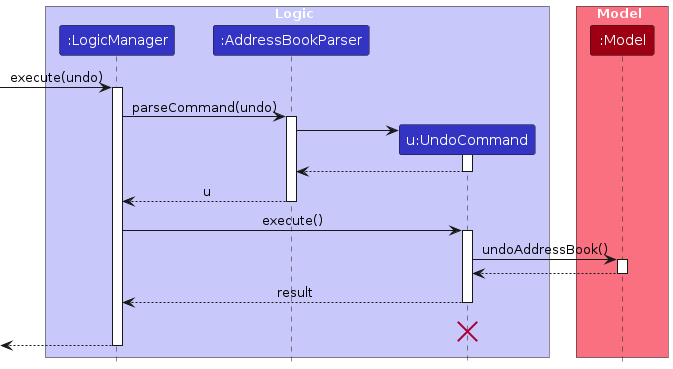
Note: The lifeline for UndoCommand should end at the destroy marker (X), but due to a limitation of PlantUML, it continues to the end of the diagram.
Similarly, how an undo operation goes through the Model component is shown below:
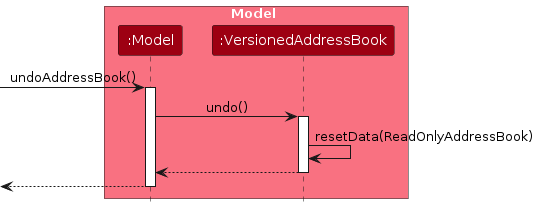
The redo command does the opposite — it calls Model#redoAddressBook(), which shifts the currentStatePointer once to the right, pointing to the previously undone state, and restores the address book to that state.
Note: If the currentStatePointer is at index addressBookStateList.size() - 1, pointing to the latest address book state, then there are no undone AddressBook states to restore. The redo command uses Model#canRedoAddressBook() to check if this is the case. If so, it will return an error to the user rather than attempting to perform the redo.
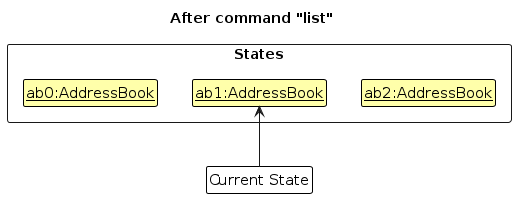
Step 5. The user then decides to execute the command list. Commands that do not modify the address book, such as list, will usually not call Model#commitAddressBook(), Model#undoAddressBook() or Model#redoAddressBook(). Thus, the addressBookStateList remains unchanged.
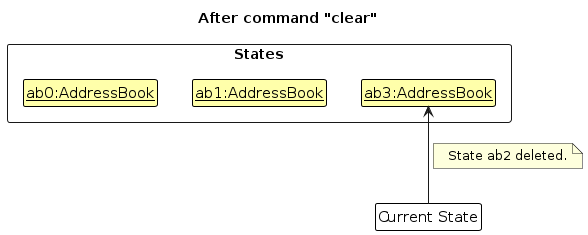
Step 6. The user executes clear, which calls Model#commitAddressBook(). Since the currentStatePointer is not pointing at the end of the addressBookStateList, all address book states after the currentStatePointer will be purged. Reason: It no longer makes sense to redo the add n/David … command. This is the behavior that most modern desktop applications follow.
The following activity diagram summarizes what happens when a user executes a new command:

Design considerations:
Aspect: How undo & redo execute:
Alternative 1 (current choice): Saves the entire address book.
- Pros: Easy to implement.
- Cons: May have performance issues in terms of memory usage.
Alternative 2: Individual command knows how to undo/redo by itself.
- Pros: Will use less memory (e.g. for
delete, just save the person being deleted). - Cons: We must ensure that the implementation of each individual command is correct.
- Pros: Will use less memory (e.g. for
{more aspects and alternatives to be added}
[Proposed] Data archiving
{Explain here how the data archiving feature will be implemented}
Documentation, logging, testing, dev-ops
Appendix: Requirements
Product scope
Target user profile:
- has a need to manage a significant number of contacts
- prefers desktop apps over other types of applications
- can type fast
- prefers typing to mouse interactions
- is reasonably comfortable using CLI apps
Value proposition: Manage contacts faster than with a typical mouse-driven GUI application.
User stories
Priorities: High (must have) - * * *, Medium (nice to have) - * *, Low (unlikely to have) - *
| Priority | As a … | I want to … | So that I can… |
|---|---|---|---|
* * * | new user | see usage instructions | refer to instructions when I forget how to use the App |
* * * | user | add a new person | |
* * * | user | delete a person | remove entries that I no longer need |
* * * | user | find a person by name | locate details of persons without having to go through the entire list |
* * | user | hide private contact details | minimize chance of someone else seeing them by accident |
* | user with many persons in the address book | sort persons by name | locate a person easily |
{More to be added}
Use cases
(For all use cases below, the System is the AddressBook and the Actor is the user, unless specified otherwise)
Use case: Delete a person
MSS
User requests to list persons
AddressBook shows a list of persons
User requests to delete a specific person in the list
AddressBook deletes the person
Use case ends.
Extensions
2a. The list is empty.
Use case ends.
3a. The given index is invalid.
3a1. AddressBook shows an error message.
Use case resumes at step 2.
{More to be added}
Non-Functional Requirements
- Should work on any mainstream OS as long as it has Java
25or above installed. - Should be able to hold up to 1000 persons without noticeable sluggishness in performance for typical usage.
- A user with above average typing speed for regular English text (i.e. not code, not system admin commands) should be able to accomplish most of the tasks faster using commands than using the mouse.
{More to be added}
Glossary
- Mainstream OS: Windows, Linux, Unix, or macOS
- Private contact detail: A contact detail that is not meant to be shared with others
Appendix: Instructions for manual testing
Given below are instructions to test the app manually.
Note: These instructions only provide a starting point for testers to work on; testers are expected to do more exploratory testing.
Launch and shutdown
Initial launch
Download the JAR file and copy it into an empty folder.
Double-click the JAR file.
Expected: The GUI opens with a set of sample contacts. The window size may not be optimal.
Saving window preferences
Resize the window to an optimal size. Move the window to a different location. Close the window.
Relaunch the app by double-clicking the JAR file.
Expected: The most recent window size and location are retained.
{ more test cases … }
Deleting a person
Deleting a person while all persons are being shown
Prerequisites: List all persons using the
listcommand, with multiple persons in the list.Test case:
delete 1
Expected: The first contact is deleted from the list. The status message shows the deleted contact's details.Test case:
delete 0
Expected: No person is deleted. The status message shows error details.Other incorrect delete commands to try:
delete,delete x,...(where x is larger than the list size)
Expected: Similar to previous.
{ more test cases … }
Saving data
Dealing with missing/corrupted data files
- {Explain how to simulate missing or corrupted data files and state the expected behavior.}
{ more test cases … }